
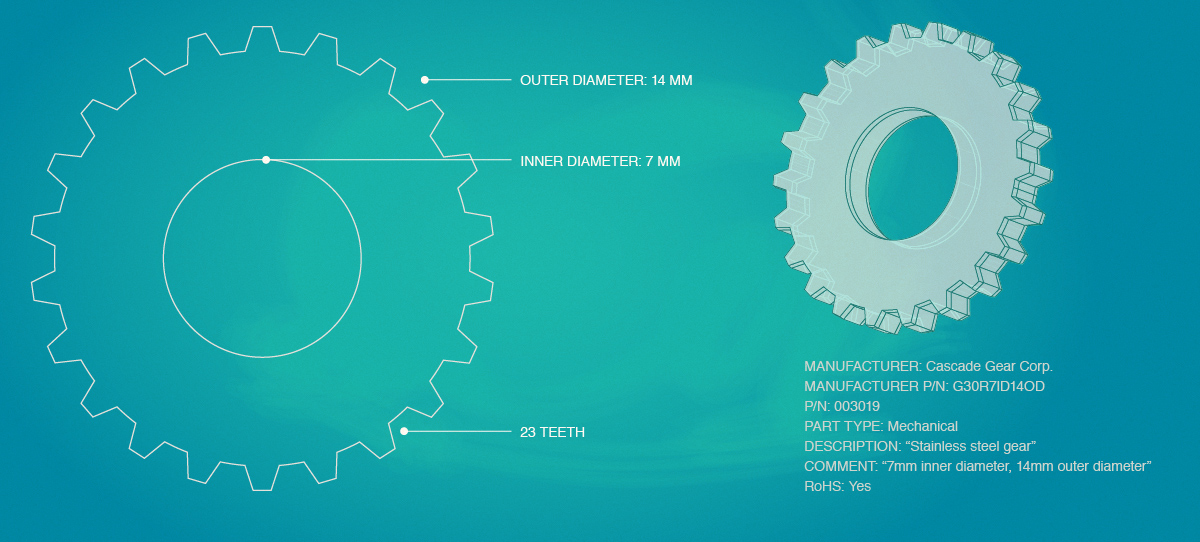
Entry into quarantine is only allowed through one of three “gates”: build finalization, receipt of inventory on a purchase, and manual (deliberate) movement into quality control (including creation of new inventory in a quarantine zone). These three gates are discussed in detail below. Whenever a QCR is created, the new QCR starts in the Triage state awaiting activation.
Item Master “Quality Control Required”
An additional “QC Required” setting is available for each item as a lifecycle parameter. When set, material is required to pass through quality control before it is added to non-quarantine locations. When not set, the material can still be passed through quality control by receiving it to a quarantine location.
Build Finalization
In a manufacturing environment, the completion of an assembly is commonly a checkpoint for quality control. Whether inventory is spot checked or subject to a comprehensive inspection, the material is moved into quarantine immediately following assembly so that the results of the process can be checked and any defects identified.
The build finalization page (shown below) will indicate if the assembly being built has the QC Required attribute set. In this case, the inventory unit that is generated as a build product must be created in a quarantine warehouse zone and a corresponding QCR will be created.
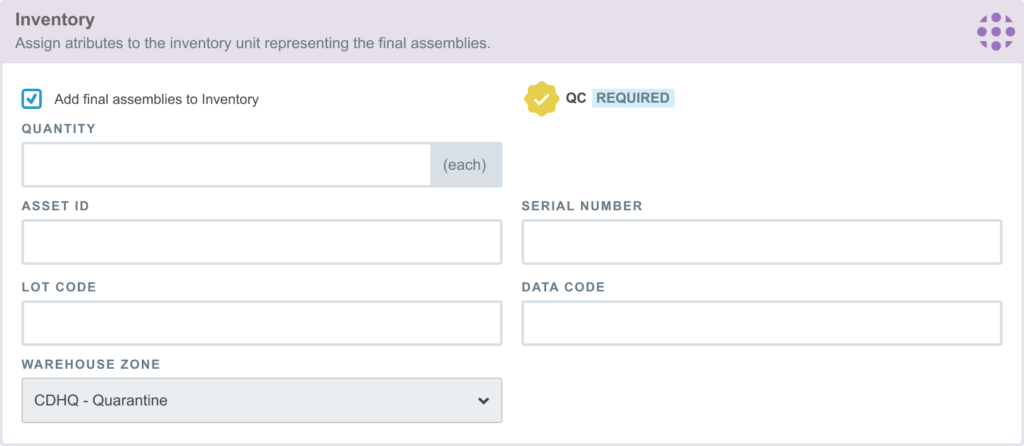
If the QC Required attribute is not set, then all zones at the build warehouse will be available. If a quarantine zone is selected, then a QCR will be created, as required.
Purchase Receipt of Goods
Quality control may also be required when purchasing pre-assembled goods from a supplier. In this case, the material passes through the quarantine gate when it is received from the supplier and logged into inventory. Similar to the situation with builds, if an item is marked as QC Required, then the item must be received into a quarantine zone. If not so marked, then the item may be received into any zone, but a QCR will be created if a quarantine zone is selected.
Manual Movement into Quality Control
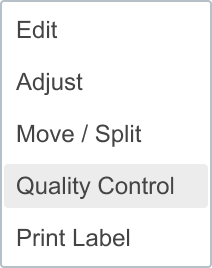
In addition to the above approaches, any inventory unit may be deliberately moved to a quarantine zone and the requisite QCR created. This is done by selecting “Quarantine” from the inventory unit drop down on the item’s inventory tab.
Quality Control Memos
Quality Control Memos (QCM) are a mechanism that allows you to forward some Q/C information to a new QCR prior to creating the QCR. This can be helpful for creating template instructions for Q/C or creating build-specific handling. Quality Control Memos are established in two locations: an item’s Quality tab and the build Finalize tab. These are referred to as Item QCM and Build QCM, respectively
In each case, the contents of the QCM is copied to the new QCR upon creation. These notes appear below the QCR description and can be edited separately once the QCR is created.
Item QCM
Each item can have one quality control memo. This QCM serves as a template and is copied to a new QCR, whether it is created from a build, purchase, or item movement to quarantine.
The typical use case for an Item QCM is to create template guidance or reference for quality control for that item. You might include complete instructions for carrying out Q/A or some acceptance criteria, etc.
Build QCM
Any time a build product will be created within quarantine, the finalization tab has an option to enter a Build QCM. The QCR is not created until the build is finalized. The Build QCM provides a way for production to enter any build-specific guidance to that would be applicable to the build. For example, special customer considerations, handling for first article evaluation, or guidance for deviations present on the build.